Every module. All of it.

This is the full surface of ClearGrid Command, the same system our own operations run on. No roadmap slides; everything below is live product.

The home view: the whole book, before you touch anything.

Command opens on the portfolio, not on an empty search box. Every number here is a filter, so the question you just asked becomes the queue you work next.

Portfolio stats, per lender

Customers, valid debt, recovered and committed percentages and total payments — switchable between one lender and the whole book, with the change on each figure shown against the last period.

Custom views

Teams compose the operational view they actually need without anyone rebuilding the system for them.

Monthly trends

Promises to pay and settled deals plotted month by month across six months, the year to date or a full twelve, so you can see whether this month is a blip or a direction.

Deal-stage statistics

Allocated, attempted, right-party contact, promise to pay and broken promise, shown as one funnel with the conversion at each step. You can see exactly where the book is leaking.
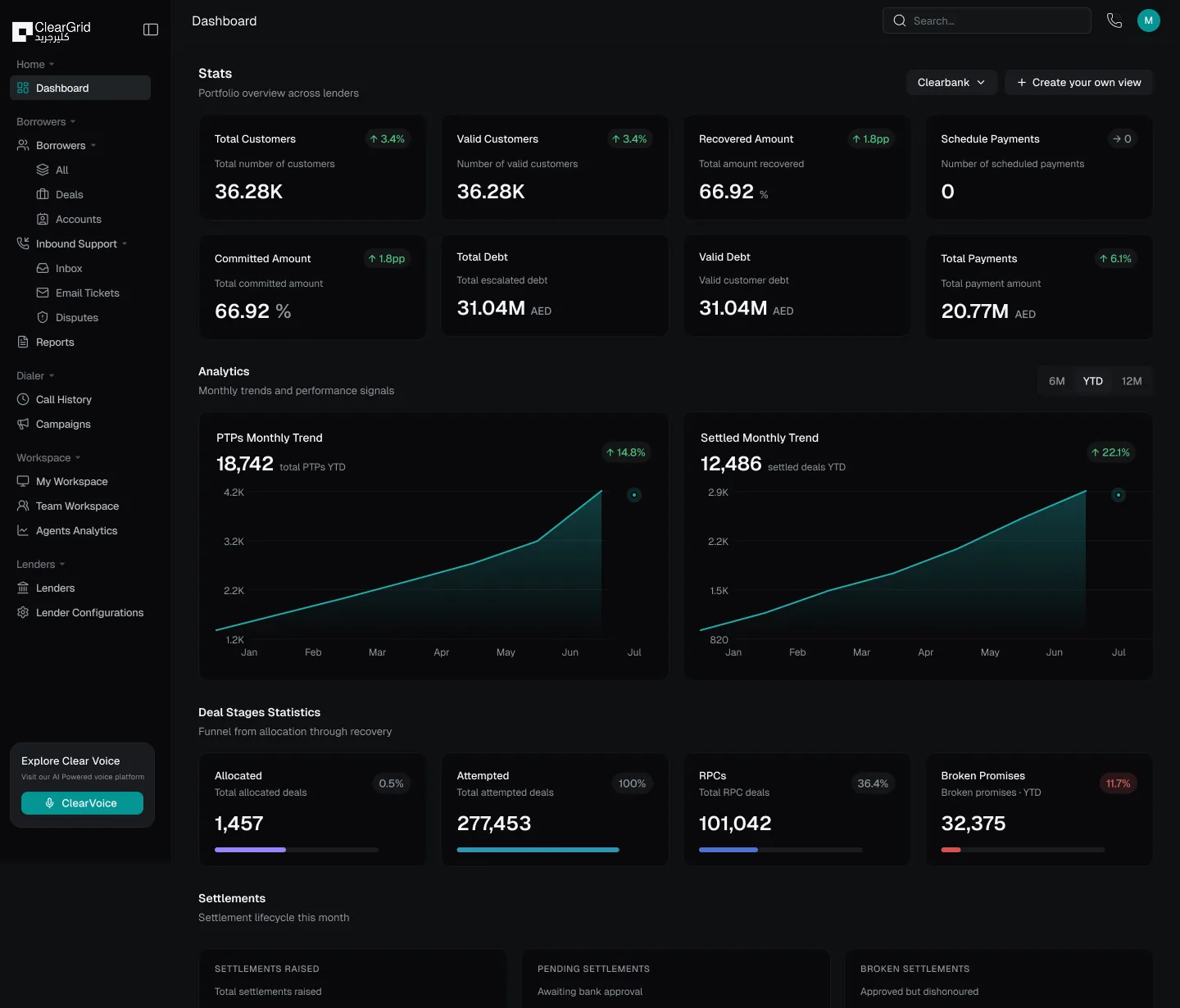
Command dashboard: portfolio stats per lender, monthly promise and settlement trends, and the deal-stage recovery funnel
All 10 capabilities in this module

Settlement tracking

Raised, awaiting bank approval, and approved-but-dishonoured — every state visible until the money actually clears.

Split by ageing bucket

Allocation and recovery broken out across nought to thirty days, thirty-one to sixty, sixty-one to ninety and ninety-one plus — with the amount and the customer count in each. This is the view that tells you whether you are working the winnable end of the book.

Target versus actual

A monthly recovery goal, what has actually been recovered against it, and the percentage achieved — not assembled in a spreadsheet at month end.

Connected-call conversion

What share of connected calls turned into a payment within twenty-four hours, forty-eight hours and seven days. The gap between those three numbers tells you whether your follow-up is working.

Promise-to-pay health

Promises made, payments actually received after them, and the conversion between the two — alongside a separate broken-promise count and rate that flags itself when it needs attention.

Analytics

Recovery, engagement and days-past-due movement, by lender, product and period.
01 · Reporting

Everything reportable. Every account reconstructable.

Control, evidence and trust — the numbers your committee asks for, and the trail your auditor asks for, from the same source.

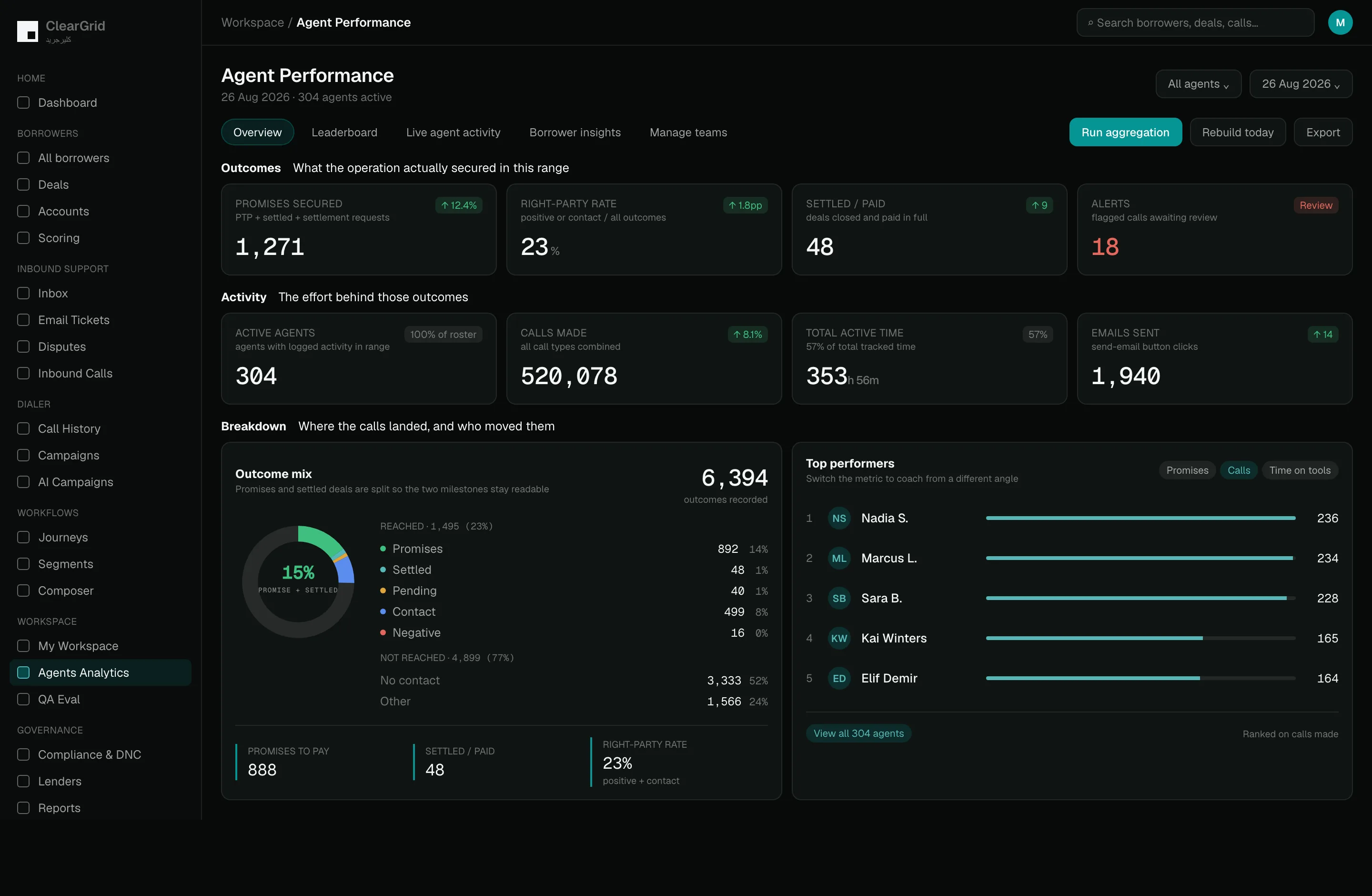
The outcomes that decide recovery

Promises secured, right-party rate, deals settled and paid in full, and how many flagged calls are still waiting on review. Each one with its own definition on screen and its movement against the last period.

The activity behind those outcomes

How many agents actually logged work as a share of the roster, calls made across every call type, total active time as a share of time tracked, and messages sent. Effort and result, side by side.

Where the calls actually landed

Every outcome split into reached and not reached, then broken down further — promises, settled, pending, contact, negative, no contact. Promises and settled deals are counted separately so the two milestones never blur into one number.

Aggregate on demand, export anywhere

Re-run the aggregation or rebuild today’s figures when you need them current, then export the whole thing.

ClearGrid Command — reports
All 9 capabilities in this module

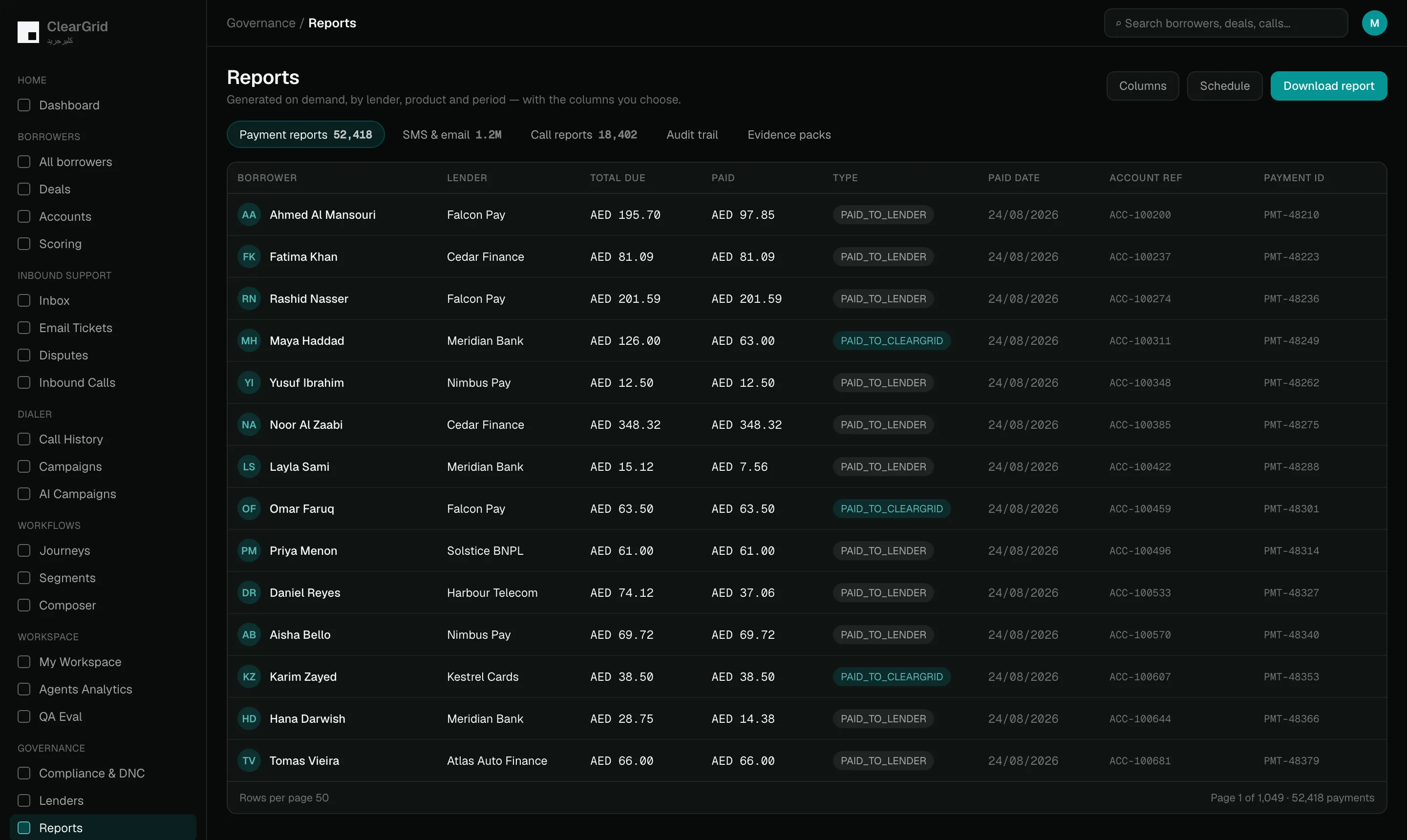
Payment reports

By lender, product and period, generated on demand with the columns you choose.

SMS and email reports

Delivery, engagement and response across every messaging channel.

Call reports

Volumes, outcomes and dispositions, across both AI and human calls, on one set of definitions.

Complete audit trail

Every decision, interaction and state change, so any account can be reconstructed end to end rather than assembled from four systems.

Exportable evidence

Compliance and operations can download the proof, not just look at it on a screen.

02 · Borrower data

One live state per borrower, not twelve stale copies.

Everything known about an account in one place — balances, contactability, history, propensity — kept current by the work itself rather than by a nightly batch.

Accounts, deals and timelines

Every call, message, promise, payment and change of status lands on one ordered history. Anyone who opens the account reads the same story in the same order.

Borrower trails

The trail records exactly where a borrower’s conversation was left off. Any channel or any agent picks it up from that point instead of starting the whole conversation again.

Predictive scoring

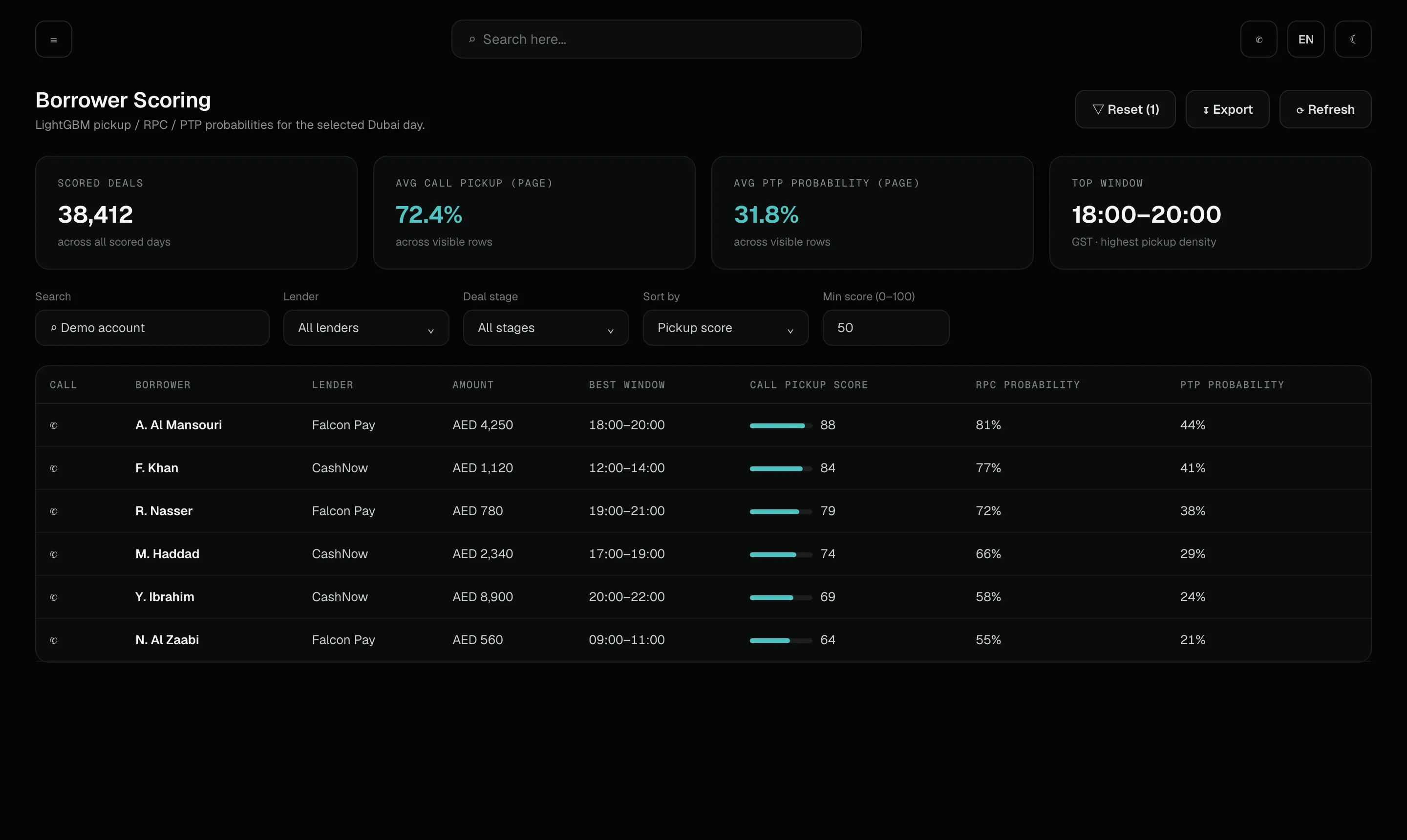
Command estimates how likely a borrower is to pick up, how likely the person on the line is the right-party contact — the borrower themselves rather than a relative or a wrong number — and how likely they are to make a promise to pay. It also points to the window in the day when reaching them tends to work best.

Audiences and segments

Groups are defined by days past due, collections stage and behaviour, and then they keep themselves current as those facts change. Journeys and campaigns draw the people they contact straight from those groups.

Scoring: call pickup score, right-party-contact probability, promise-to-pay probability and the best contact window per borrower
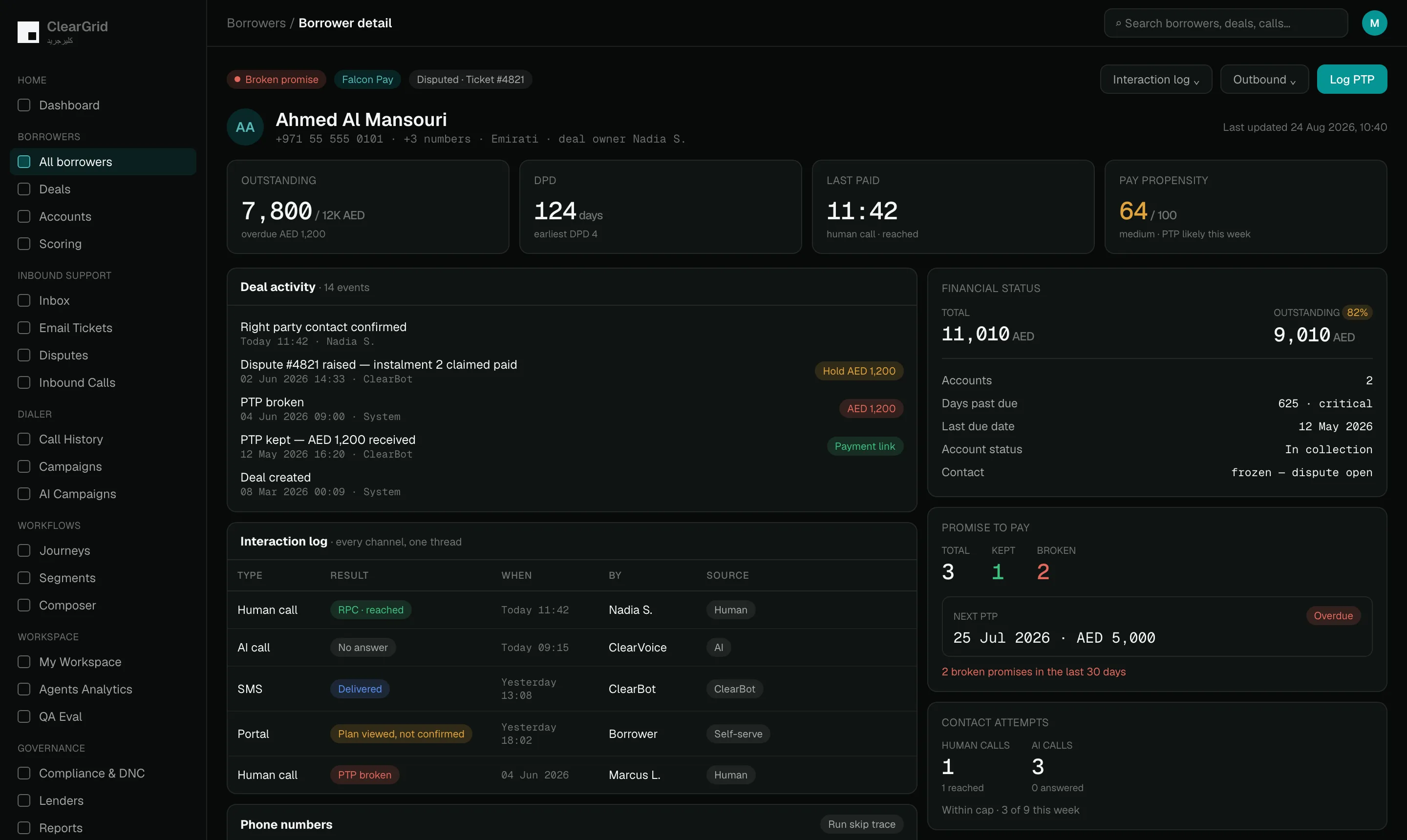
Borrower profile: outstanding balance, days past due, pay propensity, the accounts held, the full deal-activity trail, promise-to-pay history and every number on file
All 11 capabilities in this module

Borrower insights

How reachable someone is, which channel they answer on and whether they keep their promises are rolled up for each borrower. One look tells you how to approach this person and how much weight to give their word.

Duplicate detection

The same person can arrive twice under different lenders or in different files. Command flags the likely matches so they merge toward one borrower state rather than several competing versions.

A pay-propensity score with a read on it

Not just a number out of a hundred but a band and a plain-language call — whether a promise is likely this week. The agent gets a judgement, not a statistic to interpret.

Every number on file, with what happened to it

Their own number, a spouse, an employer, an old friend — each labelled, each showing which channels it supports, whether it has been verified, and the last thing that happened when someone tried it.

Balances that reconcile with the lender

Total exposure across every account they hold with you, what is still owed as a share of it, what is genuinely past grace, and when the lender’s own system last synced.

One trail split the way you need to read it

The full interaction history, filterable down to just the conversations, just the tickets, or just the journeys that touched this account.

Skip tracing

When a borrower has gone quiet, tracing looks for fresh ways to reach them. Any new number or address feeds straight back into the account state for the next attempt.

03 · Inbound support

When the borrower comes to you, nothing is lost.

Inbound is where recovery is won cheaply and lost quietly. Every inbound route lands attached to its account, in a queue somebody owns.

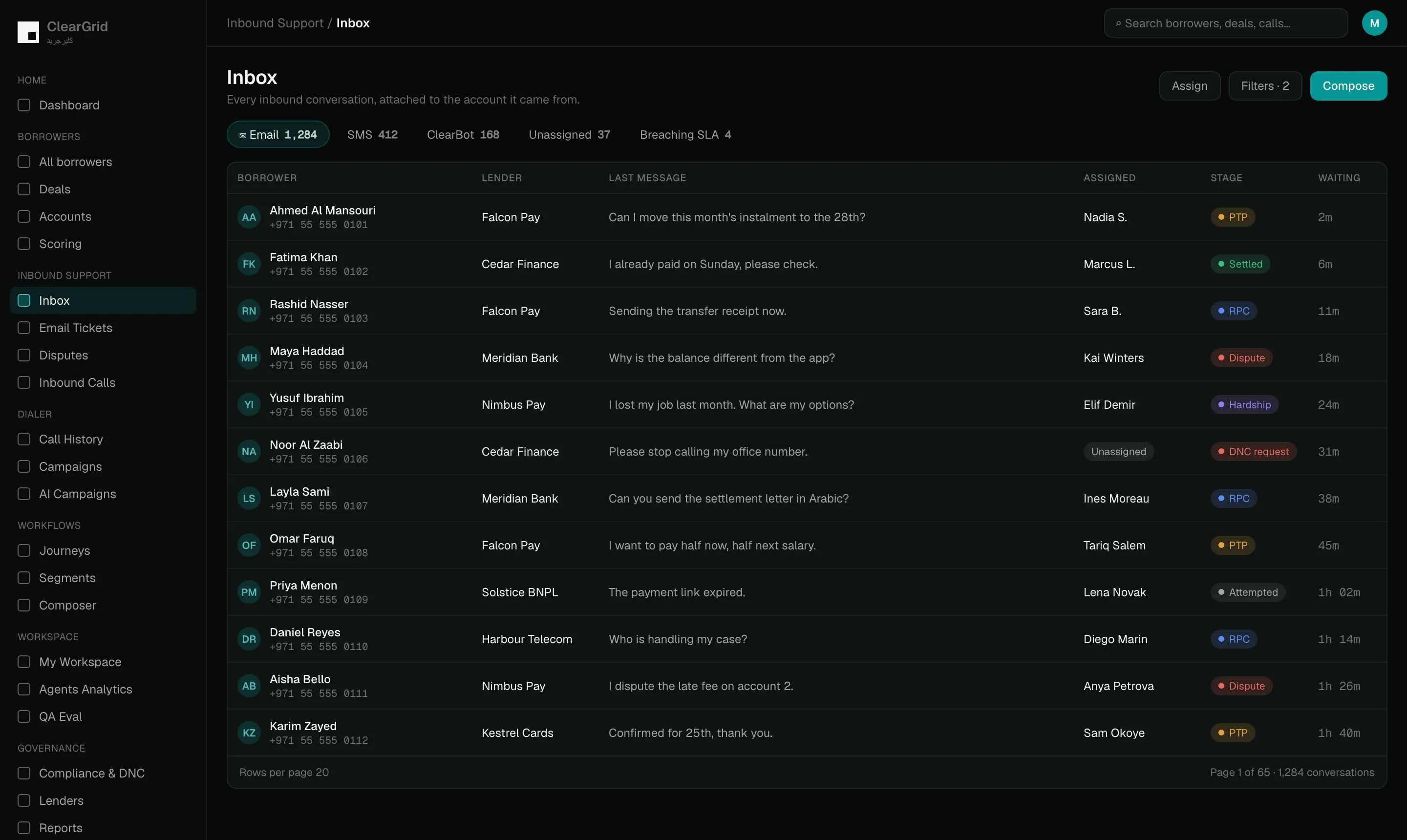
Unified inbox

Email and ClearBot conversations land in one queue instead of separate tools. Each thread is attached to the account it came from, so whoever opens it can already see the full history.

Email tickets

Every inbound email becomes a ticket with a clear state: needs a reply, open, assigned, in progress, awaiting the borrower or on hold. One named person owns the deal at any moment, so nothing sits unanswered because everyone assumed a colleague had it.

Disputes queue

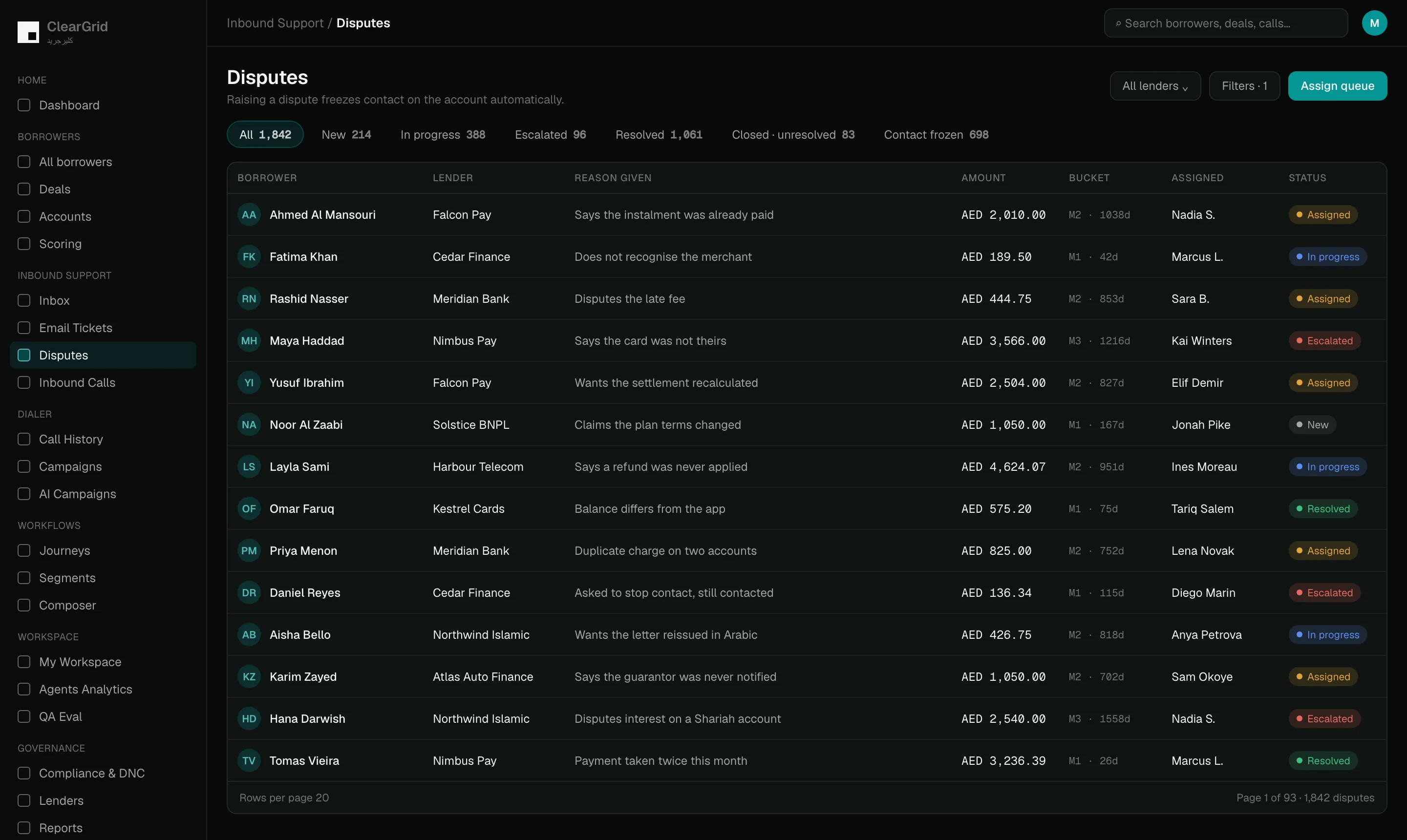
When someone challenges a balance or a charge, the case opens as a dispute and moves through new, in progress, pending, resolved, assigned and closed. Each lender gets its own view with labels and days past due — how long the account has been unpaid — so the oldest cases are easy to spot.

Contact freeze

While an account is in dispute, outbound contact stops automatically. Nobody has to remember to pause the calls and messages by hand.

Inbound configuration

Each published phone number — its DID, or direct inward dialling number — is pointed at the right dialler, agent group or AI overflow for the moments when every agent is busy. Live status and alerts show whether each route is working, so a silent number does not go unnoticed.

ClearGrid Command — inbox
ClearGrid Command — disputes
04 · Dialer

Every call, every campaign, one history.

Manual calls, campaign calls, inbound calls and AI calls sit in the same log on the same definitions — which is the only way a comparison between them means anything.

Campaigns at scale

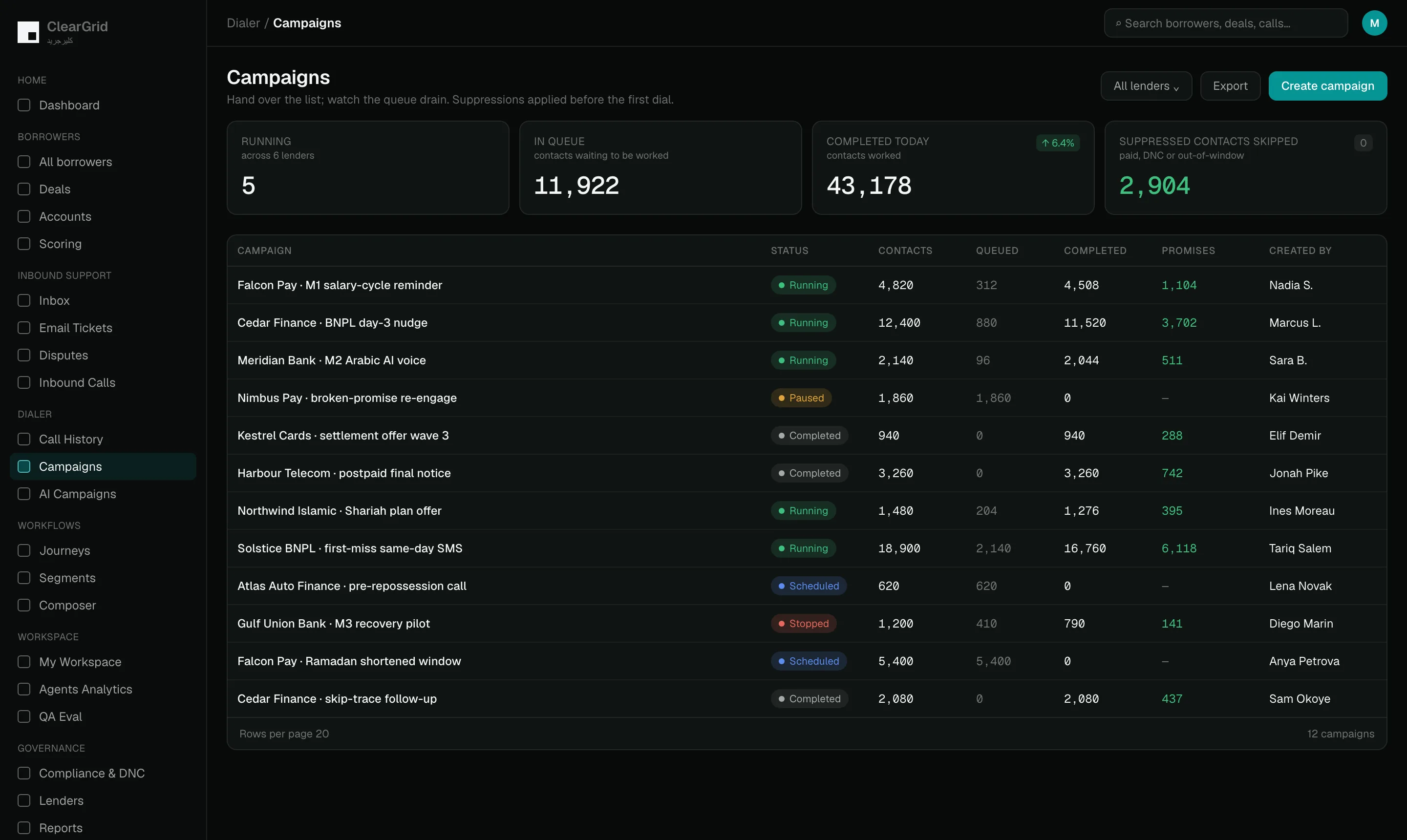
Hand over a list of accounts and the platform works through the queue, showing you what is waiting, what is being processed right now and what is finished. You can watch it live and let AI campaigns run on their own once you trust them.

Campaigns you can watch run

Every campaign with its contact count, how many are queued, how many completed, how many succeeded and how many failed — moving through queued, processing, processed and completed, and pausable or stoppable mid-flight.

Complete call history

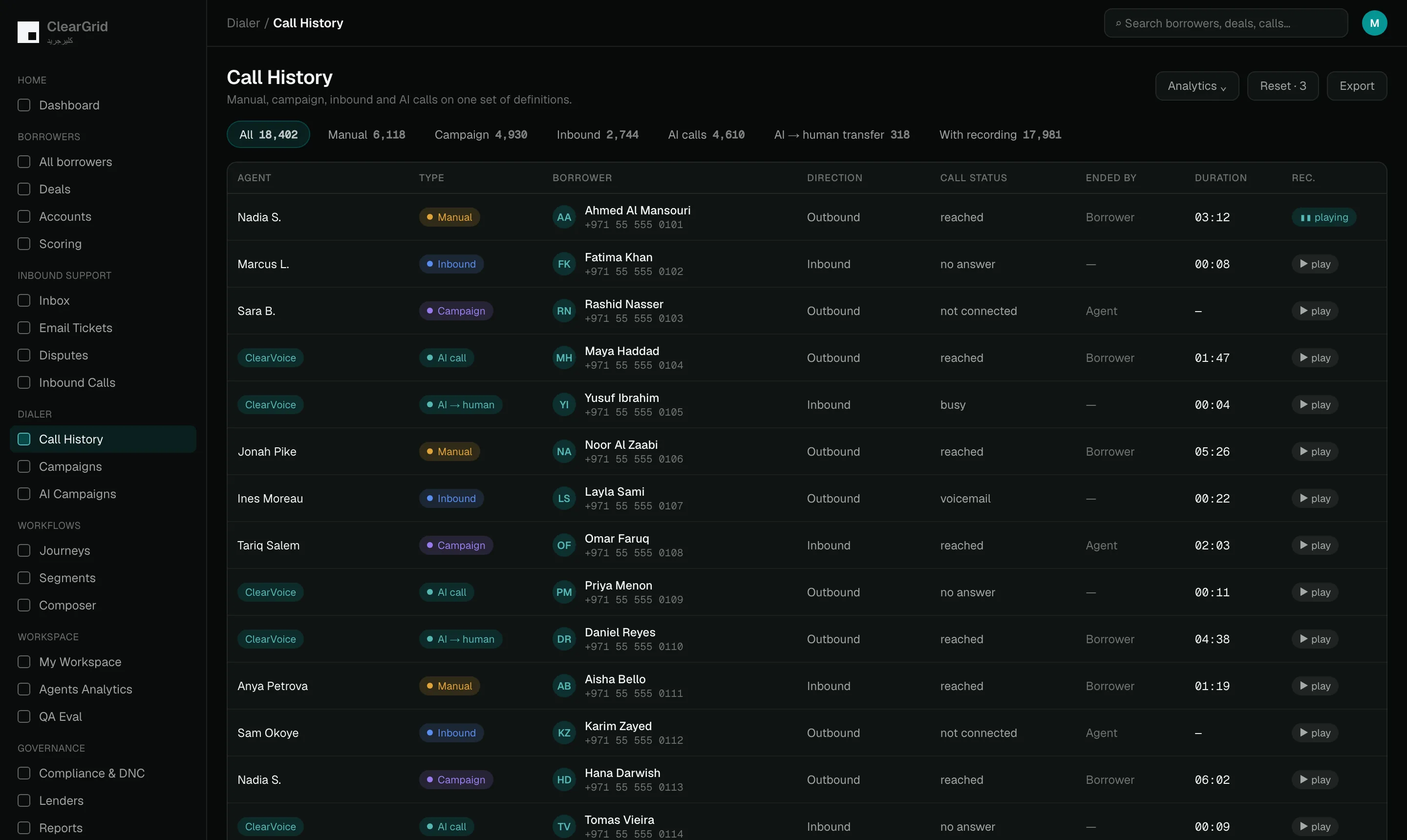
Every call sits in one place, whether it was dialled by a person, placed by a campaign, answered inbound, handled by AI or passed from AI to a colleague. Filter by status, outcome, the disposition the agent chose at the end, how long the call ran, who hung up and whether it was abandoned before anyone answered.

Every call recorded, and playable in the browser

Open the recording from the call row and play it back with a waveform, jump five seconds either way, change the speed, bookmark a moment or download the file. Your compliance team does not need a separate system to listen to a call.

ClearGrid Command — calls
ClearGrid Command — campaigns
All 8 capabilities in this module

Filter the history the way you actually think

By agent, campaign, lender and date range, then by call type, how the call ended, its status, its outcome, its disposition, whether it was abandoned and how long it lasted. Manual and AI calls sit in the same table.

Unknown calls are not lost

Inbound numbers that do not match an account land in their own queue rather than disappearing.

DID routing

A DID is direct inward dialling: one of the phone numbers your customers see and ring back. Each number carries its own rules, so you choose whether a dialler, a particular agent group or AI overflow picks up on it.

Call analytics

Pickup, connection and conversion are measured the same way for AI as for people. That is what lets you compare the two honestly instead of arguing about it.

05 · Journey builder

Strategy you can see, version and defend.

The journey is the strategy: who enters, what happens, in what order, under which rules — built on a canvas instead of buried in a stored procedure. The composer that writes the messages lives here too.

Journey GPT

Type the strategy you want in plain language and Journey GPT drafts the canvas for you. A person then reviews and edits every block before it goes anywhere near a borrower.

Eight block families

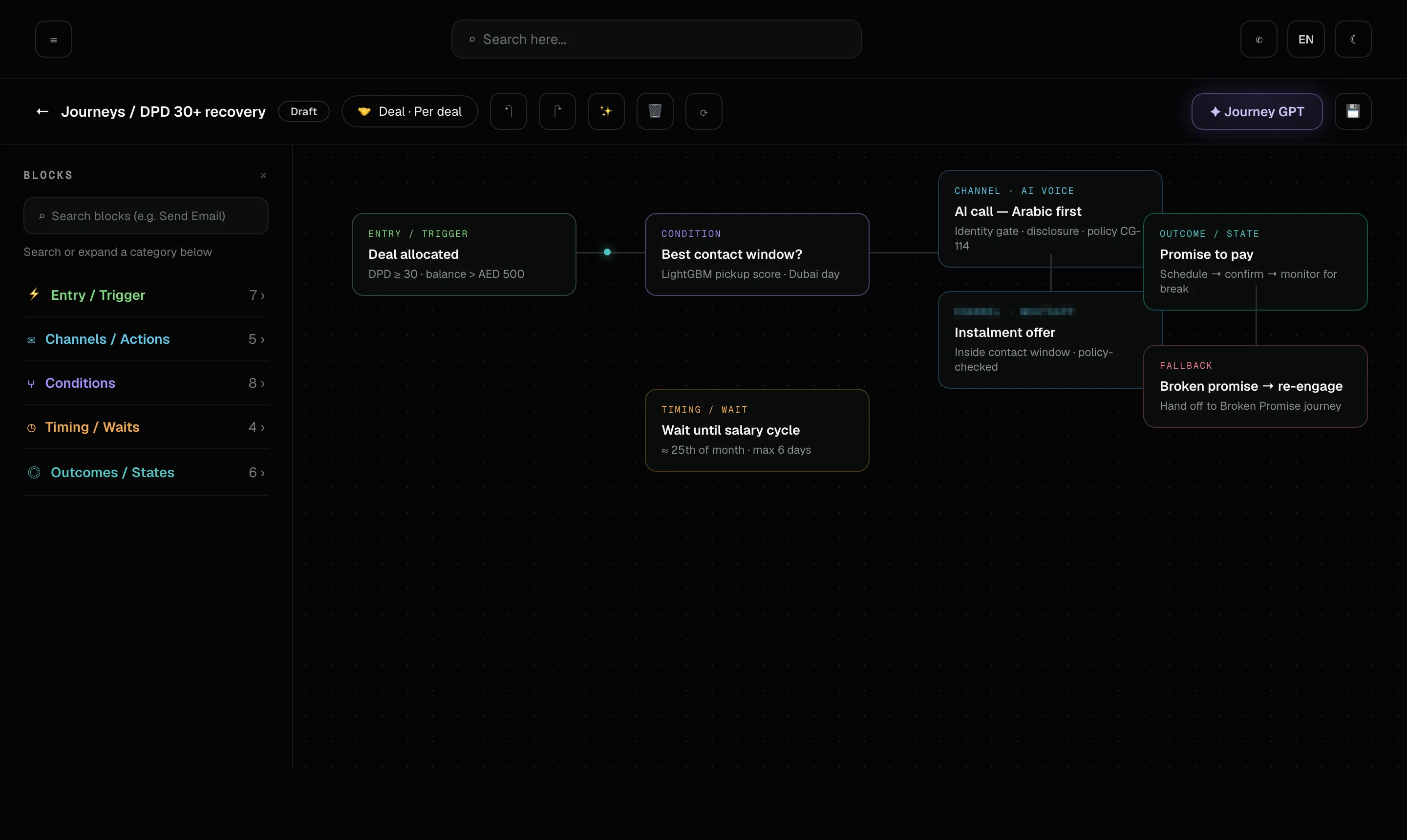
Every canvas is assembled from eight kinds of block: entry and triggers, channels and actions, conditions, flow controls, data and state, integrations, AI and optimisation, and exit and governance. Between them they cover what puts a borrower on the path, what happens along it and how they leave.

Rules and policy engine

One place holds the rules every journey must obey: actions, triggers, segments, escalations, contact windows, frequency caps, do-not-contact (DNC) lists and offer eligibility. Change a rule once and every journey that relies on it follows the new version.

Draft first, publish explicitly

A journey stays a draft until someone deliberately publishes it, with locking, versioning and change notes recorded as it evolves. Nothing reaches a borrower because someone clicked the wrong thing.

Journey builder canvas: entry trigger, contact-window condition, AI voice and messaging blocks, a salary-cycle wait and a broken-promise fallback
All 10 capabilities in this module

Validate and test-run

Before a journey goes live it passes static checks, validation of every AI call and a test run on sample cases. You see exactly what the journey would do while no real borrower is contacted.

Master journeys and folders

Folders and master journeys keep each lender’s treatment organised and route borrowers into the right stage: right-party contact (RPC), promise to pay (PTP), broken promise, hardship and skip tracing. Skip tracing is the stage for borrowers whose phone numbers and addresses no longer work.

Per-journey reports

Each journey carries its own report, so outcomes and performance stay attributable to the journey that governed them. When two approaches run alongside each other, you can tell which one did the work.

Composer

Follow-up messages drafted by AI with the whole account in view, then checked against the lender’s rules before anyone can send them.

Writing Styles

Tone, purpose, language and wording rules set per lender, so a message on behalf of one bank never sounds like a message on behalf of another.

Templates

Approved SMS and email variants with controlled design and editable slots. The agent fills the gap; they do not rewrite the compliance line.

06 · ClearVoice

Voice AI you can command, and audit.

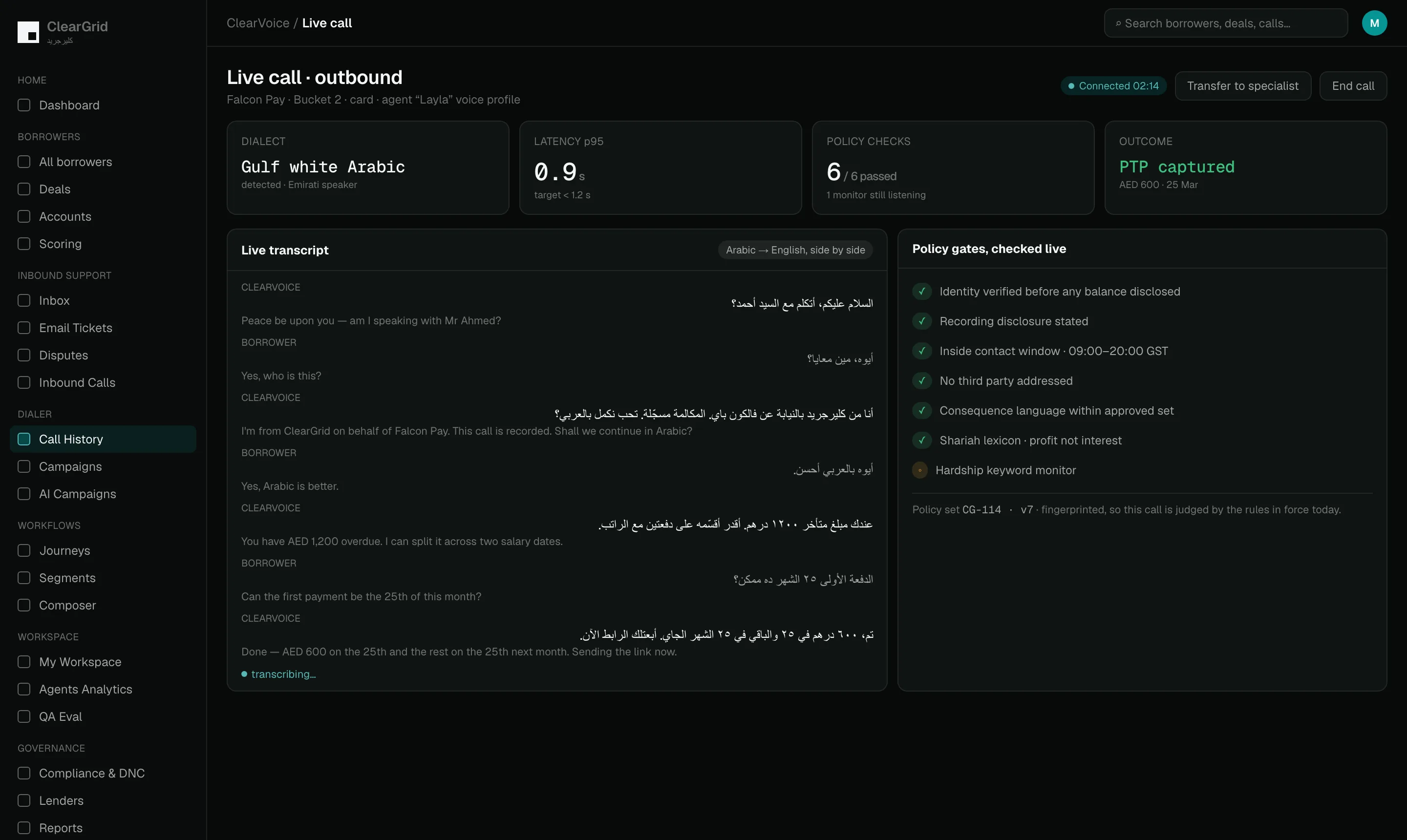
AI agents that call, verify, negotiate and log every word — in Arabic and English, inside the rules you set.

AI agents, trained by you

You decide how each agent behaves: the strategy it follows, the identity checks it runs before it will discuss an account and the disclosures your own policy requires it to read out. You can also see which agents are still in training and which are ready for live calls.

Arabic and English

Agents speak both languages, so the customer hears the one they are comfortable in. This is stated plainly rather than left as an assumption.

Inbound AI overflow

When your people are on other calls or off shift, AI answers instead of leaving the customer listening to a ringing phone. You get an alert and can take the call back in one click, so control never leaves your side.

ClearGrid Command — clearvoice
07 · Agent workspace & agent analytics

Your human team, running on rails — and measured on them.

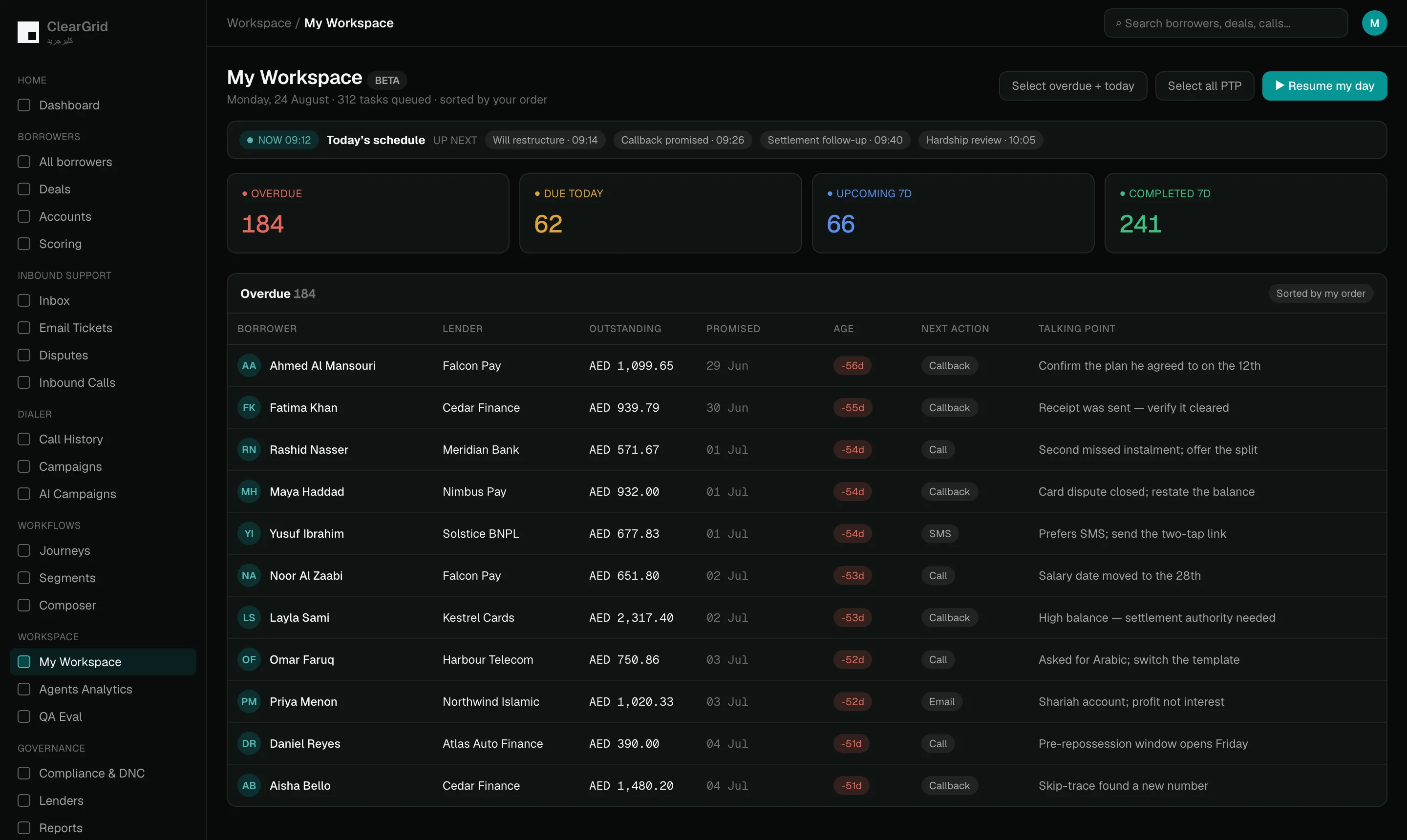
Your collectors do not open a spreadsheet and decide where to start. They open one screen that already knows what is overdue — and every hour they spend on it comes back as a number you can coach from.

My Workspace

Each agent’s day as four counts they cannot argue with: overdue, due today, coming up in the next seven days, and finished in the last seven. Every row carries the borrower, the lender, the amount, the due date and how many days late it already is.

Resume My Day

One button that picks up exactly where the agent stopped. Nobody spends the first ten minutes of a shift working out what to do first.

Focus Mode

One task at a time, on a single screen, with everything needed to make the call already on it. No tabs, no hunting, far fewer mistakes.

The account is already on screen

Outstanding balance, how many promises this borrower has made and how many they actually kept, and when the last one broke. The agent knows who they are calling before the line connects.

ClearGrid Command — my workspace
ClearGrid Command — analytics
All 13 capabilities in this module

Talking points, not a script

A primary line for what this call is actually about, and a fallback for when the borrower cannot pay in full — including what the agent is allowed to offer without asking anyone. A restructure inside the approved limit needs no approval call.

Work in batches when it makes sense

Select everything overdue and due today in one action, or pull every outstanding promise to pay, and work the set as a block.

Filter down to the work that matters

By agent, lender, channel, task type and status — or sort into an order the agent has chosen and keeps.

Performance and leaderboards

Promises secured, right-party contact rate, calls made and time actually spent on the tools. Coaching starts from the same numbers everyone can see rather than from an opinion.

Teams and assignment

Hardship specialists, single-lender pods and language splits, fed automatically by the journeys and escalations rather than by someone reassigning rows by hand.

Leaderboards you can switch

Rank the floor on promises secured, on calls made, or on time spent on the tools. High activity and high conversion are not the same skill and the same leaderboard cannot show you both.

Per-agent activity, in detail

Active time against idle time, promises secured, borrowers touched, repeat contacts, calls split between outbound and campaign, and which page each agent spent their day on. Sortable on every column.

Live agent activity and team management

Who is working right now, borrower-level insight rollups, and the team structures that journeys and escalations route into.

Which parts of the product get used

Most-viewed sections ranked, and where active time actually landed across the operation. If your team is living in skip trace rather than in conversations, this is where you see it.

Catch every broken promise, the day it breaks.

A borrower who promised to pay and then did not is not a dead account. They engaged and they intended to pay, and something got in the way. Most collections operations never find out what — because nobody notices the promise broke until month end.

The promise is a record, not a note

An amount and a date, held as a state on the account. Not free text in a call log that nobody ever queries.

It breaks on its own, in the system

The promised date passes without the payment landing and the account changes state by itself. No report to run, no month end, nobody having to remember.

Kept versus broken, for life

Every borrower carries their whole promise history — how many they have made, how many they kept, the rate, and how many broke in the last thirty days. That is the difference between a first slip and a pattern, and it changes the conversation completely.

The next promise is flagged before it is late

The upcoming promise, its amount and its date sit on the profile with an overdue marker the moment it passes. A repeat breaker is visible to whoever picks up the account next.

All 10 capabilities in this module

It becomes somebody’s job automatically

The break creates a rework task, assigned, dated and prioritised in an agent’s queue, with the days it has been sitting there shown in red.

The agent sees every attempt already made

How many times we have tried, how many were human calls and how many were AI, how many connected and how many were answered. Nobody re-dials a number that has failed four times.

The next offer is already approved

If they cannot pay in full, the fallback is waiting — a restructure inside a limit the lender set. No hold music while somebody asks a manager.

Or the journey re-engages without anyone

Where a call is not the right answer, the broken promise hands the account to its own journey and re-engagement continues on whichever channel that borrower actually responds to.

A dispute freezes it instead

If the borrower says they already paid, the dispute holds the amount and stops outbound contact rather than chasing someone who may be right.

And it shows up in the portfolio view

Broken promises sit in the funnel next to promises made and payments received, with a broken count and a broken rate that flag themselves when they need attention. You can see whether your problem is getting commitments or keeping them.

08 · Compliance & DNC audit

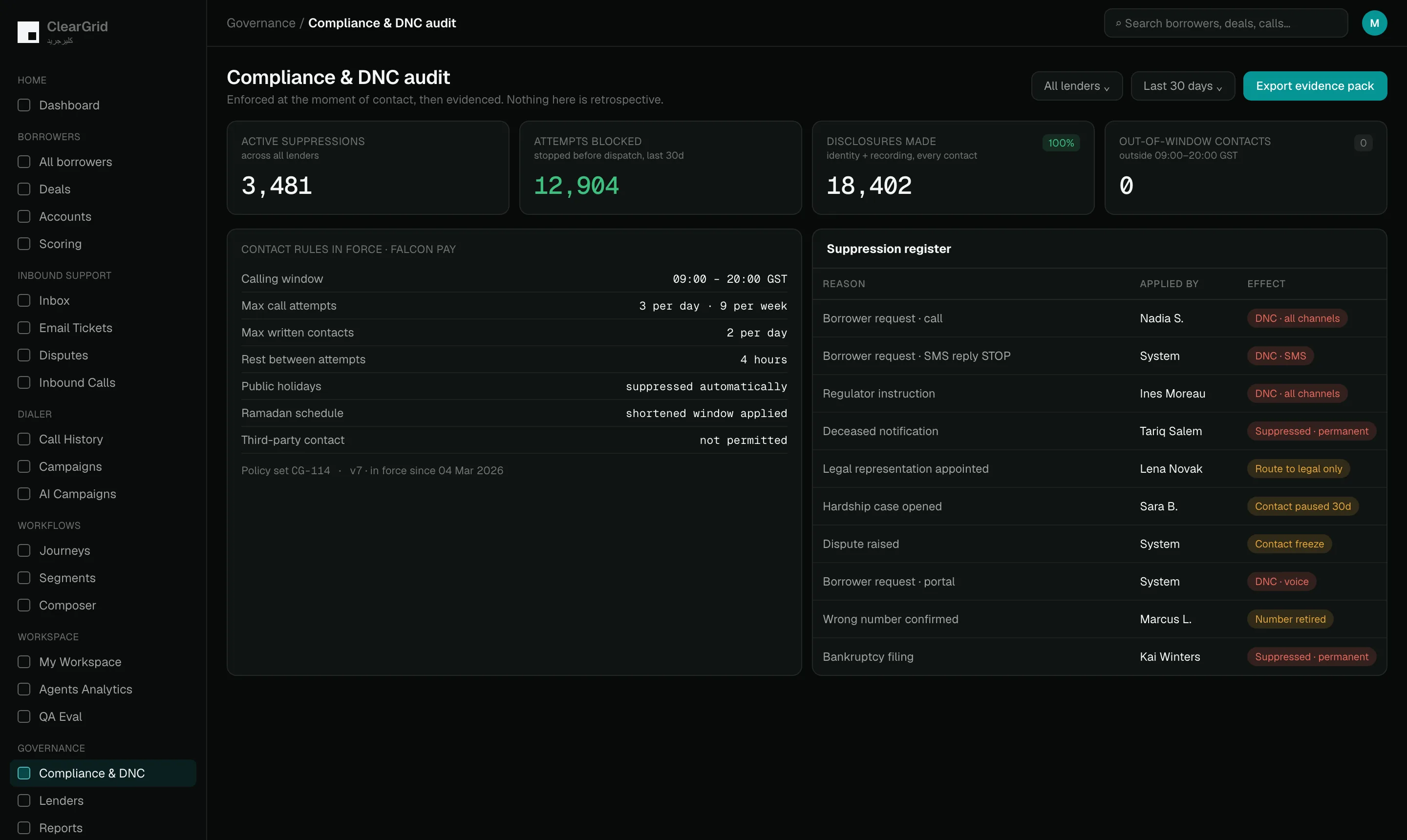
Conduct enforced by the platform, then evidenced.

Rules that live in a policy document get broken. Rules that live in the engine cannot be. Command enforces conduct at the moment of contact, and keeps the proof that it did.

Contact windows and frequency caps

Calling hours, message limits per day and per week, and rest periods between attempts. Set once per lender and per market, enforced by the platform on voice, SMS and email alike — not left to an agent’s judgement at 9pm.

Do-not-contact (DNC) audit

When a borrower asks to stop being contacted, that is a do-not-contact instruction and it has to hold. Command records who applied the suppression, when it happened and why — then shows the evidence that every blocked message and call really was stopped.

Required disclosures, every time

Identity, the reason for the call and the borrower’s rights, stated on every contact in the language the borrower chose. The AI cannot skip them and a person cannot forget them.

Consent and channel permission

What each borrower has agreed to be contacted on is held on the account and respected by every journey, so permission is a property of the borrower rather than a setting on a campaign.

ClearGrid Command — compliance
All 7 capabilities in this module

Deliverability monitoring

Command watches spam thresholds, suppression rules and the health of each channel while outreach is still running. Trouble is raised mid-flight instead of being discovered once the damage is already done.

Policy versions, fingerprinted

Every rule set carries a version. When a call is reviewed months later you can tell which policy was in force when it happened, rather than judging old work by today’s rules.

An evidence pack, not a promise

Suppressions applied, contacts blocked, disclosures made, windows respected — exportable for a regulator or an internal audit without anyone assembling it by hand.

09 · QA Eval

Every call judged by the same standard.

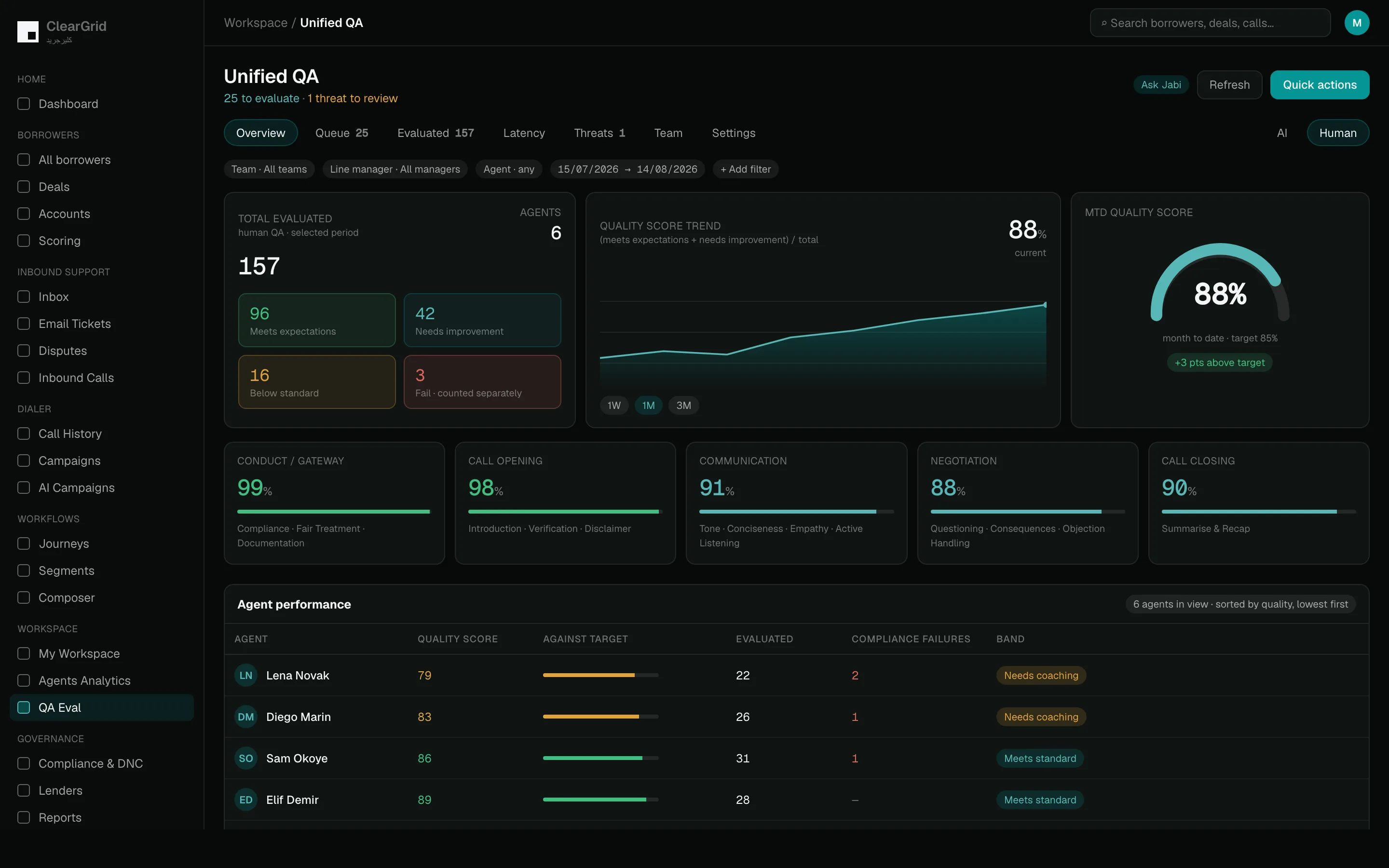
Your licence and your brand ride on every conversation, whether a person made the call or the AI did. Unified QA scores both against one model, names exactly which check failed, and puts a human in front of every evaluation before it is filed.

One model for AI and people

AI calls and human calls are scored the same way, so “is the AI as good as my team?” becomes a question your own dashboard answers rather than an argument.

Four bands, not a pass mark

Every evaluated call lands as role model, needs improvement, below standard or fail. You can see the shape of your quality, not just an average that hides both ends.

A quality score against a target you set

Tracked for the period you choose and month to date, with the definition shown on screen so nobody has to ask how it was calculated.

Failed checks, named and counted

Not a score with no explanation. The checks that failed most often in the window are listed and ranked, each with how many calls it affected and which category it belongs to — AI logic, call quality or how the call was closed.

ClearGrid Command — qa
All 13 capabilities in this module

We audit our own AI for the things you are worried about

Hallucination and getting a borrower’s gender wrong are tracked as named, counted failure modes, alongside pushing too hard for a payment date and referring someone to the wrong place. If our AI does it, it appears in your report.

Compliance failures broken out separately

A missed disclosure is not the same kind of problem as a clumsy closing line. Compliance failures are counted on their own so they cannot be averaged away.

Latency treated as a quality metric

Response time measured on every call and reported at the median, the 90th and the 95th percentile. A borrower who hears a pause assumes the line has dropped.

An AI co-evaluator drafts it, a person approves it

Jabi reads the call and drafts the full scorecard in seconds, every check carrying a confidence level and a quote from the call as its evidence. Nothing is filed until someone approves it.

Ask it a question in plain language

Ask Jabi who is not doing well this week and you get a ranked list, the reason behind each name, and a link straight to the calls it read.

Legal threats never wait in a queue

Any mention of a lawyer, the police or a complaint is pulled for human review on every call, AI or human. The escalation reaches you with a written reason, and we track that you acknowledged it.

Nothing ages quietly in the queue

The review backlog is bucketed by how long each item has been waiting, so a call from last week cannot sit unevaluated behind today’s.

Your policy becomes the scorecard

Your rules are written in plain language and wired into how calls are judged, and every version is fingerprinted — so we can always show you which rules judged which call.

Coaching from evidence, not opinion

Agents ranked worst-first with their weakest area already named, so the conversation starts from what to fix.

10 · Lenders

Many lenders. One control plane. Zero bleed.

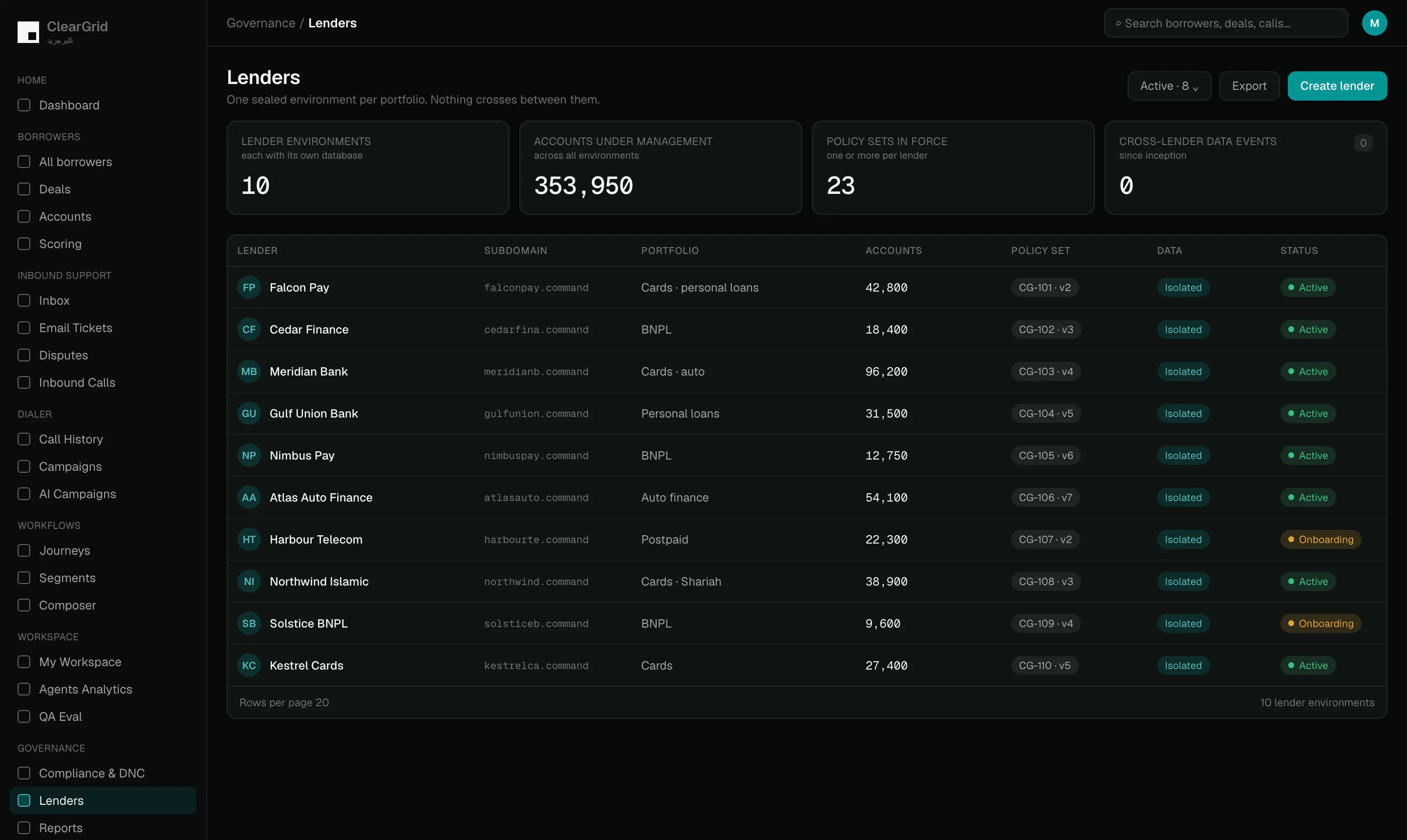
Each portfolio runs in its own environment with its own identity, rules and files. Nothing crosses between them, and every lender can be shown exactly that.

Lender register

Every lender gets its own sealed environment with its own web address, its own legal identity, its own settings and its own files. The register is the single place where all of that is set up and kept straight.

Per-lender configuration

Policies, contact journeys, writing styles and workflows are set for one portfolio at a time rather than once for everybody. What one lender has agreed to never spills over into how another lender’s borrowers are treated.

Operational workflows

Approvals, incoming file processing and daily reconciliation run on their own. Every step is logged, so anyone can see what happened and who signed it off.

Files

Portfolio data and everyday operational documents stay inside the lender environment they belong to. Nothing drifts into a neighbouring portfolio by accident.

Agency management

An agency can route accounts to the teams performing best, compare those teams on definitions that mean the same thing everywhere, and keep the borrower’s full conversation trail intact as work moves around the panel. Conduct rules are enforced by the platform rather than left to a policy document nobody reads.

ClearGrid Command — lenders

Thirty minutes. Every module. Your data.

Book a consultation